Updated: 15 March 2026
If you train machine learning models regularly, one problem shows up very quickly: after a few experiments, it becomes hard to remember what changed, which model performed better, and which hyperparameters gave the best results.
You might have one notebook with a Random Forest model, another with XGBoost, and a third one with some tuning changes. After a while, everything starts blending together. This is exactly where MLflow becomes useful.
MLflow is one of the most popular open-source tools for tracking machine learning experiments. It helps you log model parameters, evaluation metrics, artifacts, and trained models so you can compare runs more easily and avoid messy experimentation. Today, MLflow also supports broader AI workflows including LLMs and agents, but for most beginners the most useful place to start is still MLflow Tracking for classic machine learning projects.
In this beginner-friendly guide, you will learn what MLflow is, what it tracks, how to install it, and how to log parameters, metrics, and models with a simple example.
What is Mlflow ?
MLflow is an open-source platform for managing AI and machine learning workflows. In traditional machine learning projects, its most commonly used feature is experiment tracking. This allows you to record details such as:
- model parameters
- evaluation metrics
- artifacts like plots or files
- model binaries
- metadata such as tags and code-related information
MLflow Tracking provides both an API and a UI, so you can log your runs in code and later compare them visually.
In simple words, MLflow helps answer questions like:
- Which model run gave the best accuracy?
- What value of
alphaormax_depthworked best? - Which file or artifact came from which run?
- Can I reload a saved model later for inference?
That is why MLflow is so helpful in real machine learning work. It also supports deployment frameworks such as Docker and Kubernetes. It is highly secured, scalable, and supports cloud vendors like Azure, AWS, and GCP with built-in integration with docker containers.
MLOps Pipeline With Mlflow:
Mlflow enforces MLOps (Machine Learning + Dev + Ops)
Using Mlflow Machine learning models can be managed/ tracked more efficiently and have production reliably. MLOps is the method of delivering data science projects through repeatable and efficient workflows.
Advantages of Using Mlflow:
- Speeds up time for Production
- Enforces Automation & monitoring at every stage (integration, testing, release etc)
- Allows to detect bugs at early stage
- Compare your models and experiments with no extra effort
The basic life cycle of Machine learning projects are:
1. Development: Can be used for Exploratory Data Analysis (EDA), Feature engineering, Model Evaluation & Selection, validation, and Training/ Testing.
2. Deployment: Used for project management, Scalability, Batch vs Real-time data processing.
3. Operations: Monitoring model performance, Debugging, Alert, Resource Management.
4. Delivery: Dashboards, User Interfaces, Notifications & Recommendations.
What does MLFlow Tracks?
MLflow Tracking is mainly used for logging the following:
Parameters
These are the settings used to train a model.
Examples:
alphamax_depthn_estimatorssolverlearning_rate
Metrics
These are the performance values you use to evaluate a model.
Examples:
- accuracy
- precision
- recall
- AUC
- RMSE
- MAE
- R² score
Artifacts
Artifacts are output files generated during a run.
Examples:
- trained model files
- CSV outputs
- confusion matrix plots
- JSON reports
- text files
Models
MLflow can log and package trained models in reusable formats. Modern MLflow also encourages logging input examples and model signatures, which makes models easier to validate and serve later.
Tags and Metadata
You can also add tags, run names, or other metadata to keep experiments organized.
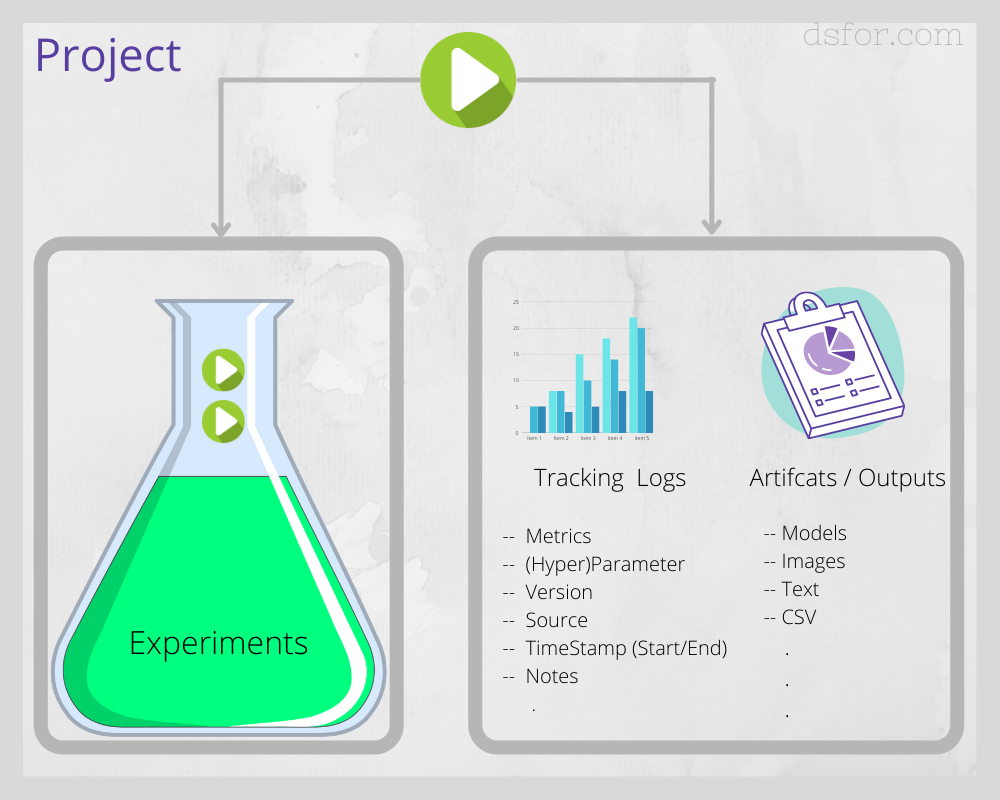
In addition, MLflow runs can be recorded to local files, to an SQLAlchemy compatible database, or remotely to a tracking mlflow server. Mlflow tool can help to organize, log, store, compare and query all your MLOps metadata.
How to install MLFlow
# Install Mlflow

pip install mlflow
After you install MLflow successfully you must be able to see mlruns folder at your present working directory. In addition, you can change the directory location in meta.yaml file: the artifact_location: ./mlruns/0

Simple Machine Learning Model (Regression example)
Let’s create our first simple machine learning model, once we train the model we will log the parameters, metrics, and model to mlruns folder. The regression model is trained on small diabetes datasets.
from sklearn.datasets import load_diabetes
from sklearn.model_selection import train_test_split
from sklearn.metrics import r2_score, mean_squared_error
from sklearn.linear_model import LinearRegression

# load the diabetes dataset
ds = load_diabetes()

X, y = ds.data, ds.target

# train test and split the dataset
X_train, X_test, y_train, y_test = train_test_split(X, y, test_size=0.25, random_state=136)

# lets train our dataset
from sklearn.ensemble import RandomForestClassifier

# Running Random Forest Algorithm
rf_clf = LinearRegression()
rf_clf.fit(X_train, y_train)
y_pred = rf_clf.predict(X_test)

print('R2 Score: ', r2_score(y_test, y_pred))
print('MSE: ', mean_squared_error(y_test, y_pred))
R2 Score: 0.5079136639649233
MSE: 2686.174339813467Source Code: https://github.com/ajju23/mlflow.git
In the above simple regression example for diabetes patients, we got the R-square value and MSE value. We can change these values every time and record all the models with source code in each run. But before that let’s do try to understand basic configurations and functions.
Common MLflow Functions You Should Know
Here are a few functions beginners should understand:
mlflow.set_experiment()sets the active experiment namemlflow.start_run()starts a run contextmlflow.log_param()logs one parametermlflow.log_params()logs multiple parametersmlflow.log_metric()logs one metricmlflow.log_metrics()logs multiple metricsmlflow.log_artifact()logs files like CSV, JSON, or imagesmlflow.sklearn.log_model()logs a scikit-learn modelmlflow.sklearn.autolog()automatically logs supported training details
These APIs are part of MLflow’s core tracking workflow.
What Changed Since Older MLflow Versions?
Older versions often focused only on:
- local
mlruns - basic params and metrics
- simple model logging
That still works, but modern MLflow puts more emphasis on:
- autologging
- model signatures
- input examples
- better packaging and dependency capture
- tracking for both classic ML and newer GenAI workflows
Mlflow Example
This model solves a regression model where the loss function is the linear least-squares function and regularization is given by the l2-norm. Below is the source code for mlflow example:
from sklearn.datasets import load_diabetes
from sklearn.model_selection import train_test_split
from sklearn.metrics import r2_score, mean_squared_error
from sklearn.linear_model import Ridge

# Importing MLflow library
import mlflow

# set tracking uri
mlflow.set_tracking_uri('/Users/ajay/PycharmProjects/MLflow/mlruns')

# set expriment ID
mlflow.set

# load the diabetes dataset
ds = load_diabetes()

X, y = ds.data, ds.target

# train test and split the dataset
X_train, X_test, y_train, y_test = train_test_split(X, y, test_size=0.25, random_state=136)

# define parameters
alpha = 1
solver = 'svd'

# Tracking model parameters
with mlflow.start_run():


    # Running Random Forest Algorithm
    lr = Ridge(alpha=alpha, solver=solver)
    lr.fit(X_train, y_train)
    y_pred = lr.predict(X_test)

    # log parameters
    mlflow.log_param('alpha', alpha)
    mlflow.log_param('solver', solver)

    # Logging Metrics
    mlflow.log_metric('R2 Score', r2_score(y_test, y_pred))
    mlflow.log_metric('MSE', mean_squared_error(y_test, y_pred))

    # Logging Model
    mlflow.sklearn.log_model(lr,'Regression Model')
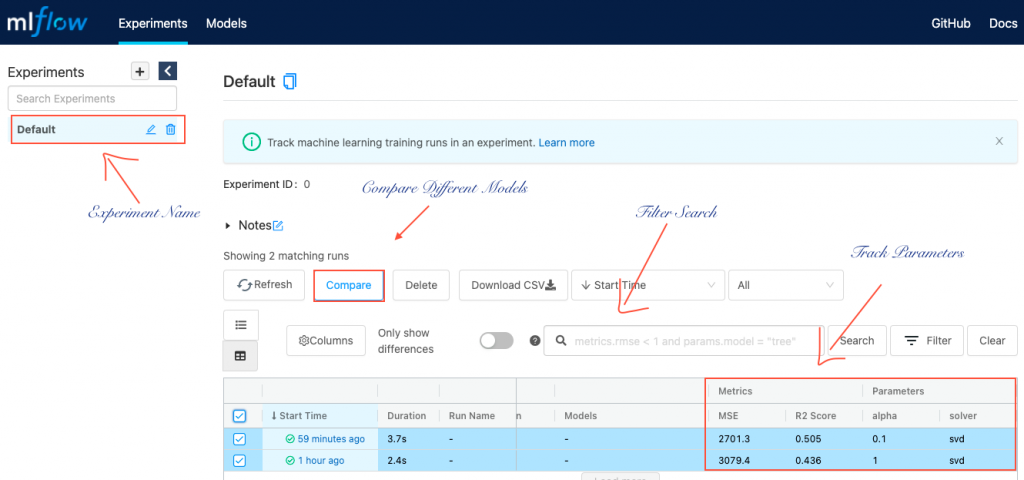
After running the above code, type mlflow ui in your terminal, the command will launch mlflow UI over localhost http://127.0.0.1:5000. To host it over different ports you can use -p with the different port numbers.
Log Multiple Parameters using Mlflow:
You can log multiple parameters at once by running for loop inside mlfow.start_run() context manager. You can also create a list of parameters and loop through the values to log the different parameters.
with mlflow.start_run():
    for val in range(0, 10):
        mlflow.log_metric(value=2*val)
Load Model To Make Prediction
After running your model over multiple algorithms and parameters, it becomes easier for the data scientist to decide which algorithm performance is better or what hyperparameters to choose. You can register your model over a remote server or choose run ID from the artifacts folder. Below is the code snippet to make predictions for unseen data by loading the model.
import mlflow
logged_model = 'runs:/c50ae6f1c21149f38bd69353bc1debb9/model'

# Load model as a PyFuncModel.
loaded_model = mlflow.pyfunc.load_model(logged_model)

# Predict
import pandas as pd
loaded_model.predict(pd.DataFrame(data))
What’s Next:
MLflow comes out to be a very powerful tool for data scientists or data science teams working with big or small datasets. The tool makes it easier with tracking, monitoring, logging, and building scalable machine learning applications. Not just machine learning algorithms, Deep learning libraries Tensorflow, Pytorch are fully supported with this tool.
FAQs: Mlfow Tool Related Questions
What are the alternatives to Mlflow ?
Mlflow is quite popular in the last few years among the open-source community. It’s easy to set up and you can track your model performance in a few minutes. However, there are some other Alternatives to MLFlow available as are Tensorflow Extended, Kubeflow, Tensorboard, Neptune.ai
Machine learning libraries supported by mlflow ?
Mlflow supports many machine learning and deep learning libraries such as Gluon, H2O, Keras, Prophet, PyTorch, XGBoost, LightGBM, Statsmodels, Glmnet (R), SpaCy, Fastai, SHAP, Prophet, scikit-learn, TensorFlow, RAPIDS
Does mlflow support big data?
Yes, mlflow can take input and write the output back 100 TB of data to distributed storage systems such as AWS S3, DBFS.
What are the use cases of mlflow?
Mlflow can be used either by individual data scientists or by data science teams. mlflow server allows multiple users to track, log results and compare the model performance.