AI coding assistants have become a normal part of modern software development, but few tools have gained as much attention as Claude Code. What started as a terminal-based coding assistant has evolved into a powerful AI development environment used by individual developers, startups, and enterprise engineering teams.
However, most developers only use a small fraction of Claude Code’s capabilities.
Many people open Claude Code, type a prompt, generate some code, and move on. In reality, Claude Code includes slash commands, workflow shortcuts, planning modes, project-specific commands, and agent workflows that can significantly improve productivity.
In this guide, we will look at the most useful Claude Code shortcuts, commands, and productivity tricks that can help you work faster and get better results
Why Learn Claude Code Commands?
If you’re constantly working with:
- Python projects
- React applications
- FastAPI services
- Data Science workflows
- AI agent development
then knowing Claude Code shortcuts can save hours every week.
The biggest productivity improvement usually comes from reducing repetitive interactions and letting Claude handle larger workflows rather than individual coding tasks.
Essential Claude Code Slash Commands
One of the most powerful features of Claude Code is its slash command system.
Simply type / inside Claude Code to view available commands. Claude provides built-in commands for workflow management, planning, context handling, and project navigation.
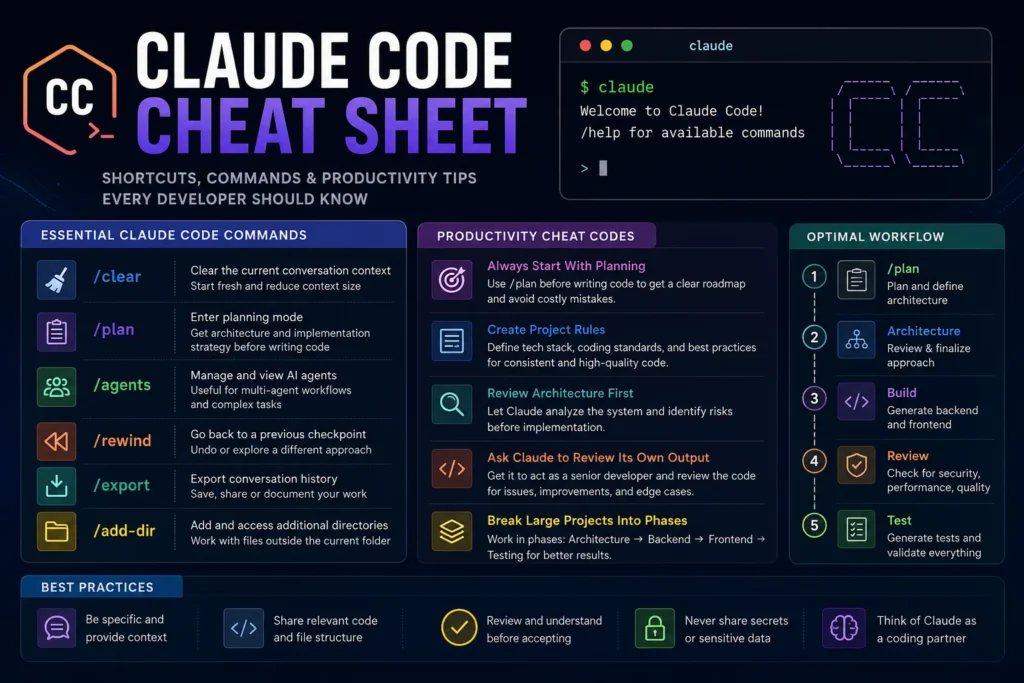
1. /clear
This clears the current conversation context.
Use this when:
- Claude starts drifting
- context becomes too large
- you want a fresh session
Example:
/clear
2. /plan
One of the most useful commands.
Instead of immediately generating code, Claude enters planning mode and focuses on architecture and implementation strategy.
Example:
/plan redesign authentication service
This works particularly well for:
- React applications
- FastAPI projects
- Microservices
- AI agent workflows
3. /agents
Claude Code supports agent-based workflows where multiple agents can coordinate tasks.
Example:
/agents
This is useful when working on:
- large refactoring projects
- code reviews
- architecture analysis
4. /rewind
A surprisingly underrated feature.
If Claude takes your project in the wrong direction, you can return to a previous checkpoint.
Example:
/rewind
Think of it as undo for your AI workflow.
5. /export
Exports the conversation history.
Useful for:
- documentation
- project records
- architecture reviews
Example:
/export
6. /add-dir
Allows Claude to access additional directories outside the current working folder.
Example:
/add-dir ../shared-services
This is extremely useful when working with monorepos.
Claude Code Productivity Cheat Codes
These are not official commands but practical techniques that experienced users employ daily.
Cheat Code #1: Always Start With Planning
Many developers immediately ask:
Build authentication API
A better approach is:
Analyze current architecture and create implementation plan before generating code.
Claude performs much better when it understands the system first.
This becomes especially important when building:
- enterprise applications
- AI agents
- simulation platforms
- microservices
Cheat Code #2: Create Project Rules
Claude performs better when given project-specific instructions.
Create a project instruction file and define:
- Use FastAPI- Use SQLAlchemy- No inline SQL- TypeScript only- Production-grade code- No mock data
Many advanced Claude Code users rely heavily on project-level instructions to maintain consistency across sessions.
Cheat Code #3: Use Architecture Reviews Before Coding
Instead of saying:
Build React frontend
Try:
Review architecture and identify risks before implementation.
This often prevents:
- overengineering
- bad folder structures
- duplicated logic
- scalability issues
Cheat Code #4: Ask Claude To Review Its Own Output
This is one of the simplest ways to improve quality.
Example:
Review the generated code as a senior software architect and identify issues.
Claude frequently identifies:
- security concerns
- missing validations
- performance bottlenecks
- maintainability problems
Cheat Code #5: Break Large Projects Into Phases
Instead of:
Build complete application
Use:
Phase 1: ArchitecturePhase 2: BackendPhase 3: FrontendPhase 4: Testing
Claude produces significantly better output when working incrementally.
Best Claude Code Workflow for AI Projects
For AI Engineering projects, a simple workflow works well:
1. /plan2. Architecture review3. Generate API contracts4. Build backend5. Generate frontend6. Review security7. Review performance8. Generate tests
This approach is much more reliable than generating everything at once.
If you’re working on AI-related applications, you may also find these guides useful:
- AI Engineers vs Data Scientists vs ML Engineers
- Real Skills Needed for AI Roles
- Why AI Will Not Replace Good Problem Solvers
These topics help build a stronger foundation before jumping directly into AI coding tools.
Common Mistakes Claude Code Users Make
The most common mistakes include:
Asking for entire projects in one prompt
Large requests often lead to inconsistent results.
Ignoring architecture reviews
Good architecture saves more time than generating code quickly.
Not defining project standards
Claude performs best when given clear development rules.
Overtrusting generated code
Even excellent AI-generated code should be reviewed for:
- security
- scalability
- performance
- maintainability
Research into AI coding assistants continues to show that developers achieve the best outcomes when AI is used as a collaborator rather than a fully autonomous engineer.
Final Thoughts
Claude Code has evolved far beyond a simple coding assistant. Today it can help with planning, code generation, project analysis, architecture reviews, and multi-step development workflows.
The biggest productivity gains do not come from generating code faster. They come from using Claude strategically.
Learning a handful of commands such as /plan, /agents, /rewind, /clear, and /add-dir, combined with structured workflows, can dramatically improve how you build software.
The developers getting the most value from Claude Code are not necessarily the ones writing the best prompts. They are the ones using Claude as a thinking partner throughout the entire development lifecycle.