
As data scientists and developers, we rely heavily on Python libraries to speed up development, automate workflows, and solve complex problems. Every day, we install new packages from PyPI or GitHub with just a single command:
pip install some-library
But very few of us stop to ask an important question:
What exactly is this library doing behind the scenes?
Can a Python library expose sensitive or personal data without us realizing it?
In most cases, popular open-source libraries are safe. However, poorly maintained, malicious, or externally dependent packages can sometimes make unexpected network calls, download remote resources, or transmit system and usage data.
When you work with confidential documents, enterprise data, or regulated information, even unintentional data exposure can become a serious risk.
This article explains how Python libraries can expose data, what warning signs to look for, and how you can practically test libraries before trusting them.
Why This Matters for Data Scientists and Developers
Python libraries often operate deep inside your workflows — processing documents, loading models, reading files, and interacting with APIs. If a package performs hidden external communication, it may:
- Download remote models or assets
- Send telemetry or usage statistics
- Transmit system metadata
- Access files without clear visibility
Even when encrypted, external connections should always be known, expected, and justified.
Understanding library behavior protects:
- Client confidentiality
- Company compliance
- Your professional credibility
How Python Libraries Can Potentially Expose Data
A Python library may expose or transmit information through:
1. Runtime Network Requests
Some libraries automatically connect to external servers to fetch models, updates, or configuration files.
2. Installation Scripts
Packages may execute code during installation using setup.py or build scripts.
3. Telemetry and Logging
Certain tools collect anonymous usage data or environment information.
4. Indirect Dependencies
Even if the main package is clean, one of its dependencies might perform remote operations.
This doesn’t mean the library is malicious — but it must be understood and verified.
Real-World Testing Example: Observing Network Behavior
While testing a document-processing (docling) library designed for layout analysis and table structure recognition, we monitored its runtime behavior.
The library loads deep-learning models locally, but during execution, we noticed outbound network requests being triggered.
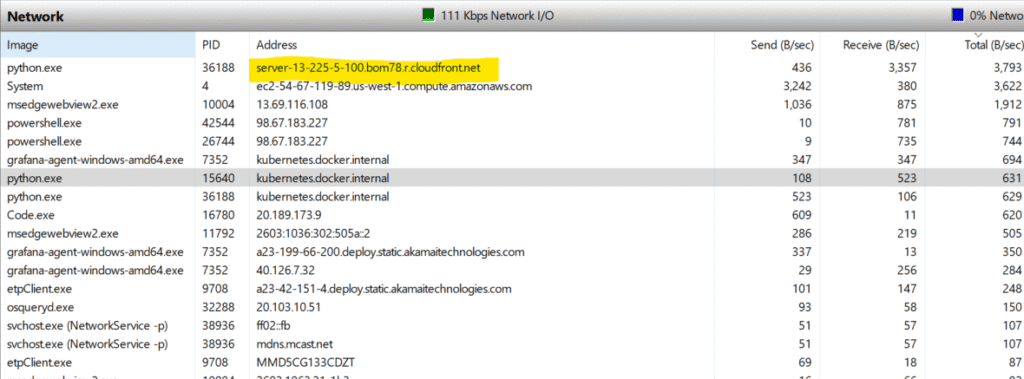
After tracing the connections, we observed requests being sent to:
server-13-225-5-100.bom78.r.cloudfront.net
This domain belongs to a CloudFront CDN, commonly used by machine learning platforms such as Hugging Face to host models and resources.
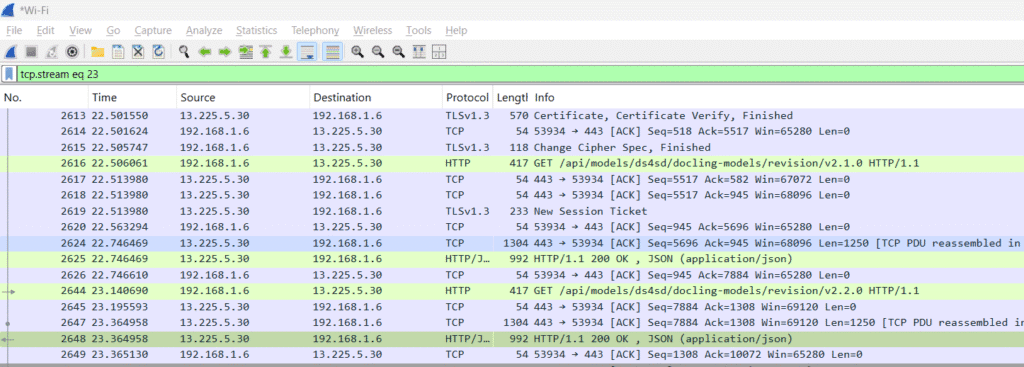
Encrypted Traffic and What It Means
The traffic was encrypted using TLS, meaning the exact request contents were not directly visible. However, encryption does not remove the importance of this finding.
It confirms that:
- The library communicates externally
- Remote resources are being accessed
- Network behavior exists beyond local execution
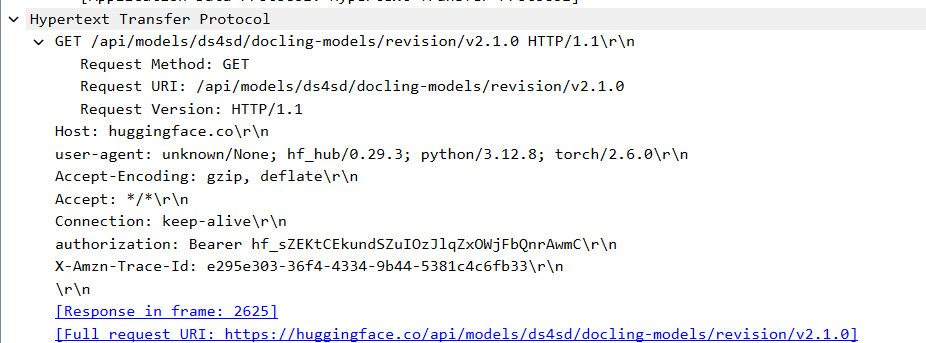
This is common in many modern ML tools, but it must be explicitly known and approved before use in sensitive environments.
Should You Be Concerned?
Not necessarily — but you should always be aware.
Popular open-source projects often rely on CDNs and model hubs. However, problems arise when:
- A library makes undocumented network calls
- External communication cannot be disabled
- The project lacks transparency
- Dependencies are obscure or unmaintained
Security risks grow significantly in enterprise, healthcare, finance, and document-processing systems.
Practical Ways to Check Python Libraries for Data Exposure
Here are practical steps you can use before trusting any new Python library:
1. Review the Source Code
Search for modules like:
requests
urllib
socket
http.client
These indicate possible network activity.
2. Monitor Network Traffic
Run the library inside:
- a virtual machine
- a Docker container
- or a restricted environment
Use tools like:
- Wireshark
- tcpdump
- system network monitors
Observe whether outbound traffic occurs.
3. Inspect Dependencies
Check:
pip show package-name
pipdeptree
Unexpected dependencies often introduce hidden behavior.
4. Isolate and Test
Execute the library with:
- internet on
- internet blocked
Compare behavior and logs.
5. Check Project Reputation
Always evaluate:
- GitHub activity
- open issues
- maintainer transparency
- community size
Safety Checklist Before Using Any Python Library
| Checkpoint | Purpose |
|---|---|
| Open-source code | Transparency |
| Active maintenance | Security fixes |
| Documented network use | Trust |
| Minimal dependencies | Reduced risk |
| Sandbox testing | Early detection |
Conclusion
Python libraries are incredibly powerful, but they are not automatically risk-free.
If you work with confidential files, business systems, or personal data, you should always:
✔ Understand what a library does
✔ Observe its network behavior
✔ Verify its dependencies
✔ Test it in isolation
A few minutes of inspection can prevent serious data exposure, compliance violations, and professional risk.
Final Thoughts
Security in data science isn’t only about models and encryption — it starts with understanding the tools we use every day.
If you regularly work with new Python packages, building this habit will significantly improve both your project reliability and your professional credibility.

